In this tutorial you will build a small robot arm in the MuJoCo physics simulator, wrap it as a Gymnasium environment, and train it with PPO, a reinforcement learning algorithm, to move its tip to a randomly placed target. You will then measure the trained policy against two baselines on the same targets: a random policy and a hand-written controller.
Each step ends with a check you can run. The full project is a set of ten files that you can download or copy from the code blocks below. Nothing here needs a physical robot or a graphics card.
Before you start
Who this tutorial is for
It is for readers who can open a terminal, run Python scripts and edit a text file, but have never trained a robot with reinforcement learning. No calculus or probability theory is assumed. Basic Python (functions, classes, NumPy arrays) will help you follow the code.
What you need
- Windows 10 or 11 (64-bit), macOS, or Linux on a 64-bit processor.
- Python 3.12 or 3.13. The pinned NumPy 2.5 release requires Python 3.12 or newer.
- A few gigabytes of free disk space for the virtual environment, checkpoints and logs. On Linux, install the CPU-only PyTorch build described below; the default Linux build also downloads NVIDIA CUDA libraries and is much larger.
- Ordinary laptop memory. We did not measure peak RAM for this guide; the default run holds four small simulations and two networks of 64 units per layer.
- No GPU. PPO with a small fully connected network runs on the CPU, and Stable-Baselines3 recommends the CPU for this case.
What the finished project does
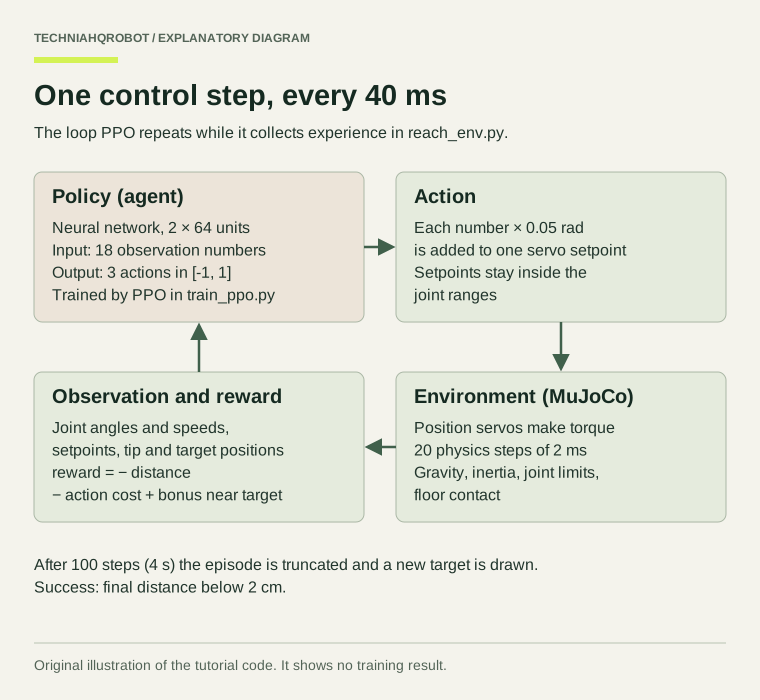
A three-joint arm stands on a pedestal. At the start of each episode a red target appears somewhere the arm can reach. Every 40 ms the policy reads 18 numbers about the arm and the target and outputs three numbers that nudge the joint servos. After 4 seconds the episode ends. It counts as a success if the tip is within 2 cm of the target at that moment.
By the end you will have a trained policy file, training curves, an evaluation table with a confidence interval for the success rate, and a comparison with the two baselines. How well your policy performs is something you measure; this guide does not promise a number.
Reinforcement learning explained from zero
Reinforcement learning (RL) trains a decision-maker by trial and error. It tries actions, receives a score called a reward after each one, and gradually prefers actions that lead to higher total reward. Nobody shows it the right movement. That is the difference from imitation learning, where a robot copies recorded demonstrations.
Agent and environment
The agent is the part that decides. Here it is a neural network called the policy. The environment is everything the agent acts on: the simulated arm, its motors, gravity, the floor, the target and the rules for scoring and ending an episode. In code, the environment is the ReachEnv class and the agent is the PPO model from Stable-Baselines3.
Observation versus full state
The simulator's state is everything needed to compute the next instant: every joint angle and speed, contact forces, actuator internals and more. The observation is the subset the policy is shown. Ours has 18 numbers: three joint angles, three joint speeds, three servo setpoints, the tip position, the target position and the vector from tip to target. A real robot could measure each of these with joint encoders and a target position from a camera or a user. The policy never sees contact forces or the exact Jacobian; keeping observations to quantities a real robot can measure is a habit worth forming early.
Actions, and why this tutorial moves setpoints
A policy can command a robot in three common ways: joint torques, joint velocities, or joint position targets. Torque control gives the most freedom but leaves the policy to learn gravity compensation and stability from scratch, and a bad torque command moves a real arm violently. Position targets hand that low-level work to a servo loop, which is how many hobby and industrial arms are driven. This tutorial uses position servos and lets each action change the setpoints by at most 0.05 rad per step. The limit caps how fast the commanded pose can move (1.25 rad/s), which keeps exploration gentle.
Reward
The reward is the only feedback the agent gets, so it defines the task. Ours is mostly the negative distance between tip and target: every step the tip is 30 cm away costs 0.3 points, and every step at the target costs almost nothing. A small penalty for large actions discourages jerky motion, and a small bonus inside 2 cm makes staying there worth more than hovering nearby. The reward function section shows what goes wrong when these terms are badly chosen.
Episodes, resets and endings
An episode is one attempt: reset the arm, place a target, run 100 control steps. Gymnasium distinguishes two ways an episode ends. Terminated means the task itself reached an end state, such as a fall or a crash. Truncated means an outside limit stopped it, usually a time limit. The difference matters to the algorithm: after a truncation it still estimates the value of the unfinished future; after a termination it does not.
ReachEnv truncates at 100 steps and terminates only if the simulation becomes numerically unstable. It deliberately does not end the episode when the tip first touches the target, because then a policy could score by swinging through the target at speed. [4] [5]
Policy and neural network
The policy is a function from observation to action. Here it is a small neural network: 18 inputs, two hidden layers of 64 units, and 3 outputs. During training it outputs a probability distribution over actions, a mean plus some spread, so it can try variations. For evaluation you usually take the mean, which is called deterministic prediction. A second network of the same shape, the value function, learns to predict how much reward the current state will lead to.
PPO in plain terms
Proximal Policy Optimization repeats one cycle. First it runs the current policy for a fixed number of steps and records what happened. Then it compares each action's outcome with what the value network expected: actions that did better than expected become more likely, actions that did worse become less likely. Finally it updates the networks several times on that batch, but clips each update so the new policy cannot move far from the one that collected the data. That clipping is what makes PPO stable enough to be a common first choice. [6] [7]
Exploration
To discover that bending the elbow helps, the policy has to try bending the elbow. PPO explores by sampling actions from its distribution, so early training looks like twitching. In simulation that costs nothing. On a real arm, random exploration can hit joint limits at speed, strike the table or a person, and overheat motors. That is one reason training happens in simulation and why the action limit above exists.
The sim-to-real gap
A policy learns the simulator, not the robot. Real joints have friction and backlash the model lacks, motors saturate and heat up, sensors are noisy and late, and link masses differ from the file. A policy that relies on any of those details being exact can fail on hardware. The last section of this guide covers what to check before a policy goes anywhere near a physical arm.
For a non-technical comparison of reinforcement learning and imitation learning, read how robots learn.
Project architecture
Two pieces of software do different jobs. MuJoCo computes the physics. Gymnasium defines the standard interface (reset, step, observation and action spaces) that any RL library can use. Stable-Baselines3 provides a tested PPO implementation built on PyTorch. Keeping the environment independent of the algorithm means you can test it fully before training and later swap PPO for another algorithm. [8] [3]
The project folder looks like this once training and evaluation have run. Only the first ten files are written by you; the runs/ and results/ folders are created by the scripts.
rl-reach/
├── requirements.txt
├── check_setup.py
├── assets/
│   └── reach_arm.xml
├── reach_env.py
├── test_env.py
├── train_ppo.py
├── plot_training.py
├── evaluate.py
├── view_policy.py
├── README.md
├── runs/
│   └── ppo_seed0/        created by train_ppo.py
└── results/              created by evaluate.py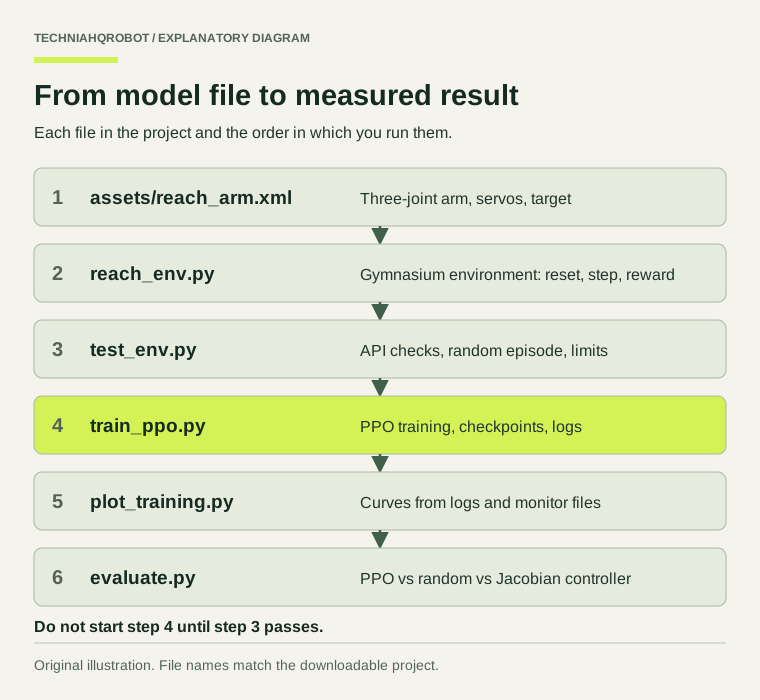
Download the complete project files from the rl-reach download folder, or copy each file from the code blocks below.
Installation and environment setup
Step 1: Check the computer
Find out what you are working with before installing anything. These commands only read information.
| Check | Windows (PowerShell) | macOS (Terminal) | Linux (terminal) |
|---|---|---|---|
| Operating system | winver | sw_vers | cat /etc/os-release |
| Python version | py --list | python3 --version | python3 --version |
| Memory (RAM) | systeminfo | findstr Memory | sysctl hw.memsize | free -h |
| Processor | Get-CimInstance Win32_Processor | Select Name, NumberOfLogicalProcessors | sysctl -n machdep.cpu.brand_string | lscpu |
| NVIDIA GPU and driver | nvidia-smi | Not applicable | nvidia-smi |
| Free disk space | Get-PSDrive C | df -h . | df -h . |
If Python 3.12 or 3.13 is missing, install it from python.org or your system package manager first. On Windows, the py launcher lists installed versions and lets you choose one with py -3.12.
A CUDA-capable GPU is optional and does not help this project. The network is tiny and most time goes into stepping the simulator, which runs on the CPU. Stable-Baselines3 warns when PPO with an MlpPolicy is put on a GPU, and the training script fixes device='cpu'. A GPU starts paying off for image observations, large networks, or GPU-based simulators such as MuJoCo Playground or Isaac Lab, which are outside this tutorial. [3] [9]
Step 2: Create the project and a virtual environment
A virtual environment keeps this project's packages separate from the rest of your system, so a version pinned here cannot break another project.
mkdir rl-reach
cd rl-reach
python3.12 -m venv .venv
source .venv/bin/activate
python -m pip install --upgrade pipmkdir rl-reach
cd rl-reach
py -3.12 -m venv .venv
.venv\Scripts\Activate.ps1
python -m pip install --upgrade pipIf PowerShell refuses to run Activate.ps1, run Set-ExecutionPolicy -Scope CurrentUser RemoteSigned once, or use the Command Prompt and .venv\Scripts\activate.bat instead. Your prompt shows (.venv) while the environment is active. Every command below assumes it is active.
Pin the dependencies
Save this file as requirements.txt in the project folder. Exact versions make the project reproducible: someone installing it next year gets the same libraries you used.
# Python 3.12 or 3.13. NumPy 2.5 requires Python 3.12 or newer.
# Versions checked against PyPI and the projects' release tags on 21 October 2026.
mujoco==3.16.0
gymnasium==1.4.0
stable-baselines3==2.9.0
torch==2.14.1
numpy==2.5.4
matplotlib==3.11.2| Package | Version | Role |
|---|---|---|
| mujoco | 3.16.0 | Physics simulator and Python bindings; the MuJoCo library is bundled |
| gymnasium | 1.4.0 | Environment interface and API checker |
| stable-baselines3 | 2.9.0 | PPO implementation, environment checker, callbacks, logging |
| torch | 2.14.1 | Neural networks used by Stable-Baselines3 |
| numpy | 2.5.4 | Arrays and maths; needs Python 3.12 or newer |
| matplotlib | 3.11.2 | Training plots and saved images |
Install
On Linux, install the CPU-only PyTorch build first. Without this step pip installs the default Linux wheel, which also downloads NVIDIA CUDA libraries you do not need here. Windows and macOS can skip it. The index URL is the one the PyTorch install selector gives for Linux, pip and CPU; check the selector if the command fails. [12]
pip install torch==2.14.1 --index-url https://download.pytorch.org/whl/cpupip install -r requirements.txtVerify the installation
Save check_setup.py and run it. It prints the operating system, Python version, CPU count, free disk space, every package version and whether PyTorch sees a CUDA GPU. Compare the versions with requirements.txt.
"""check_setup.py: print the computer and package details that matter for this project.

Run it before installing (to see Python, CPU and disk) and again after installing (to see versions).
"""

import importlib
import os
import platform
import shutil
import sys

print(f"Operating system : {platform.platform()}")
print(f"Machine          : {platform.machine()}")
print(f"Python           : {sys.version.split()[0]} ({sys.executable})")
print(f"Logical CPUs     : {os.cpu_count()}")
free_gb = shutil.disk_usage(".").free / 1e9
print(f"Free disk here   : {free_gb:.1f} GB")

if sys.version_info < (3, 12):
    print("WARNING: requirements.txt pins NumPy 2.5, which needs Python 3.12 or newer.")

for name in ["mujoco", "gymnasium", "stable_baselines3", "torch", "numpy", "matplotlib"]:
    try:
        module = importlib.import_module(name)
        print(f"{name:<17}: {getattr(module, '__version__', 'unknown version')}")
    except ImportError:
        print(f"{name:<17}: not installed")

try:
    import torch

    print(f"CUDA available   : {torch.cuda.is_available()}")
    if torch.cuda.is_available():
        print(f"CUDA device      : {torch.cuda.get_device_name(0)}")
    mps = getattr(torch.backends, "mps", None)
    print(f"Apple MPS        : {bool(mps and mps.is_available())}")
    print("This project trains on the CPU either way (device='cpu' in train_ppo.py).")
except ImportError:
passpython check_setup.pyThen confirm that MuJoCo itself loads by running a one-line simulation. It should print 3.16.0.
python -c "import mujoco; m = mujoco.MjModel.from_xml_string('<mujoco/>'); print(mujoco.__version__)"Installation problems
| Symptom | Likely cause | Fix |
|---|---|---|
| No matching distribution found for numpy==2.5.4 | Python older than 3.12 in the virtual environment | Delete .venv and recreate it with Python 3.12 or 3.13; check with python --version |
| No matching distribution for torch or mujoco | Python too new for the published wheels, or a 32-bit Python | Use 64-bit Python 3.12 or 3.13 |
| ModuleNotFoundError after a successful install | The virtual environment is not active, or a different python is on the PATH | Activate .venv and run python -c "import sys; print(sys.executable)" to confirm it points inside .venv |
| Very large download on Linux | Default PyTorch wheel with CUDA libraries | pip uninstall torch, then install from the CPU index URL above |
| pip asks for a C compiler or builds MuJoCo from source | No pre-built wheel for your platform or Python | Switch to a supported Python version rather than building from source |
The robot simulation model
Step 3: Build the simulated robot
MuJoCo models are written in MJCF, an XML format. Create a folder called assets and save this file as assets/reach_arm.xml. The comments in the file explain each part.
<!--
  reach_arm.xml: a three-joint robot arm for the TechniaHQRobot reinforcement learning tutorial.

  Frames: world z points up, x points forward. Lengths are in metres, masses in kilograms,
  angles in radians. All joint angles are zero when the arm points straight up.

  The arm is a teaching model, not a copy of a commercial robot. Its proportions are
  roughly those of a small desktop arm.
-->
<mujoco model="reach_arm">
  <compiler angle="radian" autolimits="true"/>

  <!-- 2 ms physics step. The environment applies one action every 20 physics steps (25 Hz). -->
  <option timestep="0.002" gravity="0 0 -9.81" integrator="implicitfast"/>

  <default>
    <!-- Passive joint damping and rotor inertia (armature) keep the joints numerically well behaved. -->
    <joint type="hinge" damping="0.5" armature="0.01"/>
    <!-- Arm geoms (contype 2) collide with the floor (conaffinity 2) but not with each other. -->
    <geom contype="2" conaffinity="1" density="0" rgba="0.25 0.45 0.65 1"/>
    <!-- Position servos: the policy moves each servo's setpoint; the servo produces torque. -->
    <position kp="100" dampratio="1" inheritrange="1"/>
  </default>

  <visual>
    <global offwidth="640" offheight="480"/>
  </visual>

  <worldbody>
    <light pos="0 -0.6 1.5" dir="0 0.4 -1"/>
    <geom name="floor" type="plane" size="1 1 0.05" rgba="0.9 0.9 0.88 1" contype="1" conaffinity="2"/>

    <!-- Fixed pedestal. A body without a joint is welded to the world. -->
    <body name="pedestal">
      <geom name="pedestal" type="cylinder" pos="0 0 0.05" size="0.06 0.05" rgba="0.3 0.3 0.3 1"/>

      <!-- Joint 1: base yaw turns the whole arm about the vertical axis. -->
      <body name="turntable" pos="0 0 0.1">
        <joint name="base_yaw" axis="0 0 1" range="-2.6 2.6"/>
        <geom name="turntable" type="cylinder" pos="0 0 0.025" size="0.045 0.025" mass="0.5"/>

        <!-- Joint 2: shoulder pitch tilts the upper arm forward and back. -->
        <body name="upper_arm" pos="0 0 0.05">
          <joint name="shoulder_pitch" axis="0 1 0" range="-1.6 1.6"/>
          <geom name="upper_arm" type="capsule" fromto="0 0 0 0 0 0.3" size="0.03" mass="1.0"/>

          <!-- Joint 3: elbow pitch bends the forearm relative to the upper arm. -->
          <body name="forearm" pos="0 0 0.3">
            <joint name="elbow_pitch" axis="0 1 0" range="-2.4 2.4"/>
            <geom name="forearm" type="capsule" fromto="0 0 0 0 0 0.25" size="0.025" mass="0.6"/>
            <!-- The end effector is a site: a named point with no mass or collision. -->
            <site name="end_effector" pos="0 0 0.25" size="0.015" rgba="1 0.8 0.1 1"/>
          </body>
        </body>
      </body>
    </body>

    <!-- The target is a mocap body: the code places it, physics never moves it, and it collides with nothing. -->
    <body name="target" mocap="true" pos="0.3 0 0.3">
      <geom name="target" type="sphere" size="0.02" contype="0" conaffinity="0" rgba="0.9 0.2 0.2 0.6"/>
    </body>
  </worldbody>

  <actuator>
    <!-- inheritrange="1" copies each joint range into the servo's control range. -->
    <position name="base_yaw" joint="base_yaw" forcerange="-10 10"/>
    <position name="shoulder_pitch" joint="shoulder_pitch" forcerange="-25 25"/>
    <position name="elbow_pitch" joint="elbow_pitch" forcerange="-12 12"/>
  </actuator>
</mujoco>
The arm is a chain of bodies. Each body is attached to its parent by a hinge joint, which allows rotation about one axis. Geoms give bodies their shape, collision surface and, through the mass attribute, their mass. A site is a named point without mass; the end_effector site at the tip is the point we want on the target.
| Element | Value | Meaning |
|---|---|---|
| Base yaw joint | z axis, ±2.6 rad | Turns the arm left and right |
| Shoulder pitch joint | y axis, ±1.6 rad | Tilts the upper arm forward and back |
| Elbow pitch joint | y axis, ±2.4 rad | Bends the forearm |
| Link lengths | 0.30 m and 0.25 m | Shoulder sits 0.15 m above the floor; maximum reach 0.55 m from it |
| Moving masses | 0.5, 1.0 and 0.6 kg | Turntable, upper arm, forearm; 2.1 kg in total |
| Position servos | kp = 100 N·m/rad, dampratio = 1 | Torque = 100 × (setpoint − angle), with damping set for no overshoot |
| Torque limits | 10, 25 and 12 N·m | Caps on each servo's output torque |
| Timestep | 0.002 s, implicitfast | Small enough for stable contact; implicitfast suits actuator damping |
| Collision filter | contype and conaffinity | Arm parts touch the floor but not each other |
All lengths are in metres, masses in kilograms and angles in radians, because the compiler line sets angle="radian". The world frame has z pointing up. With every joint at zero the arm points straight up. The target is a mocap body: Python code moves it, physics ignores it, and its sphere has collisions switched off, so the arm can pass through it without being pushed.
The servo gain is a compromise. Gravity pulls a bent arm down, so a position servo settles slightly below its setpoint. A higher gain shrinks that error but makes the simulation stiffer. With kp = 100, holding the arm bent at the shoulder and elbow (1 rad each) left an error of 0.034 rad at the shoulder and 0.007 rad at the elbow in our run. The policy observes both the angle and the setpoint, so it can learn to compensate.
Load and look at the model
MuJoCo's viewer opens the file directly. Drag with the mouse to rotate the camera; double-click a body and Ctrl+right-drag to push it. The arm should stand upright and resist gentle pushes. [11]
python -m mujoco.viewer --mjcf=assets/reach_arm.xmlOn a computer without a display, such as a remote server, skip the viewer. Step 5 includes an off-screen rendering check instead.
For a larger model with 29 actuators, see MuJoCo for humanoid robotics.
The custom Gymnasium environment
Step 4: Build the reinforcement learning environment
Save this file as reach_env.py in the project folder, next to the assets folder. It is the most important file in the project: it defines what the policy sees, what it can do and how it is scored.
"""reach_env.py: a Gymnasium environment in which a three-joint MuJoCo arm reaches a random target.

The policy controls position servos. Each action moves the three servo setpoints by at most
`max_target_step` radians. The servos then produce the joint torques during 20 physics steps.
"""

from pathlib import Path

import gymnasium as gym
import mujoco
import numpy as np
from gymnasium import spaces

MODEL_PATH = Path(__file__).resolve().parent / "assets" / "reach_arm.xml"

# Joint ranges used only to place targets. They sit inside the hard joint limits so that every
# target can be reached without pressing a joint against its stop.
TARGET_JOINT_LOW = np.array([-2.0, -1.2, -2.0])
TARGET_JOINT_HIGH = np.array([2.0, 1.2, 2.0])


class ReachEnv(gym.Env):
    """Move the end effector to within `success_threshold` metres of the target and stay there."""

    metadata = {"render_modes": ["human", "rgb_array"], "render_fps": 25}

    def __init__(
        self,
        render_mode=None,
        max_episode_steps=100,
        frame_skip=20,
        max_target_step=0.05,
        success_threshold=0.02,
        action_cost=0.01,
        success_bonus=0.1,
    ):
        if render_mode is not None and render_mode not in self.metadata["render_modes"]:
            raise ValueError(f"Unsupported render_mode {render_mode!r}")
        self.render_mode = render_mode

        # The model and its simulation state. `_scratch` is a second state used only to compute
        # target positions, so target sampling never disturbs the running simulation.
        self.model = mujoco.MjModel.from_xml_path(str(MODEL_PATH))
        self.data = mujoco.MjData(self.model)
        self._scratch = mujoco.MjData(self.model)
        assert self.model.nq == 3 and self.model.nu == 3, "The model must have three joints and three actuators."

        # Timing: 20 physics steps of 2 ms give one control step of 40 ms (25 Hz).
        self.frame_skip = frame_skip
        self.control_dt = self.model.opt.timestep * frame_skip
        self.max_episode_steps = max_episode_steps

        # Task and reward settings.
        self.max_target_step = max_target_step
        self.success_threshold = success_threshold
        self.action_cost = action_cost
        self.success_bonus = success_bonus

        # Look up names once. Integer ids are faster than names inside the step loop.
        self.ee_site = mujoco.mj_name2id(self.model, mujoco.mjtObj.mjOBJ_SITE, "end_effector")
        target_body = mujoco.mj_name2id(self.model, mujoco.mjtObj.mjOBJ_BODY, "target")
        self.target_mocap = int(self.model.body_mocapid[target_body])
        self.ctrl_low = self.model.actuator_ctrlrange[:, 0].copy()
        self.ctrl_high = self.model.actuator_ctrlrange[:, 1].copy()

        # Actions: one number per joint in [-1, 1], scaled to a setpoint change in step().
        self.action_space = spaces.Box(low=-1.0, high=1.0, shape=(3,), dtype=np.float32)
        # Observations: 18 scaled numbers, described in _get_obs(), clipped to [-10, 10].
        self.observation_space = spaces.Box(low=-10.0, high=10.0, shape=(18,), dtype=np.float32)

        self.target_pos = np.zeros(3)
        self.steps = 0
        self.first_reach_step = None
        self._renderer = None
        self._viewer = None

    # ----------------------------------------------------------------- Gymnasium API

    def reset(self, *, seed=None, options=None):
        # Seeds self.np_random. Every random choice below must use self.np_random.
        super().reset(seed=seed)
        options = options or {}

        mujoco.mj_resetData(self.model, self.data)
        start = self.np_random.uniform(-0.1, 0.1, size=3)
        self.data.qpos[:] = start
        self.data.qvel[:] = 0.0
        self.data.ctrl[:] = start  # The servos begin by holding the starting pose.

        if "target" in options:
            self.target_pos = np.asarray(options["target"], dtype=np.float64).copy()
        else:
            self.target_pos = self._sample_target()
        self.data.mocap_pos[self.target_mocap] = self.target_pos

        # mj_forward computes positions such as site_xpos from qpos without advancing time.
        mujoco.mj_forward(self.model, self.data)
        self.steps = 0
        self.first_reach_step = None

        distance = self._distance()
        if self.render_mode == "human":
            self.render()
        return self._get_obs(), self._get_info(distance, {})

    def step(self, action):
        action = np.clip(np.asarray(action, dtype=np.float64), -1.0, 1.0)

        # 1. Apply the action: move each servo setpoint, then keep it inside the joint range.
        self.data.ctrl[:] = np.clip(
            self.data.ctrl + action * self.max_target_step, self.ctrl_low, self.ctrl_high
        )

        # 2. Advance the physics by one control period, then refresh positions for the new state.
        bad_before = self.data.warning[int(mujoco.mjtWarning.mjWARN_BADQACC)].number
        mujoco.mj_step(self.model, self.data, nstep=self.frame_skip)
        mujoco.mj_forward(self.model, self.data)
        self.steps += 1

        # 3. Score the new state.
        distance = self._distance()
        reward, parts = self._reward(distance, action)
        if self.first_reach_step is None and distance < self.success_threshold:
            self.first_reach_step = self.steps

        # 4. Decide whether the episode ends.
        # terminated: the episode reached a terminal state. Here that only happens when the
        # simulation became numerically unstable (MuJoCo resets the state and counts a warning).
        unstable = (
            self.data.warning[int(mujoco.mjtWarning.mjWARN_BADQACC)].number > bad_before
            or not np.all(np.isfinite(self.data.qpos))
            or not np.all(np.isfinite(self.data.qvel))
        )
        terminated = bool(unstable)
        # truncated: the time limit ended the episode, not the task.
        truncated = bool(self.steps >= self.max_episode_steps)

        info = self._get_info(distance, parts)
        if terminated or truncated:
            # Success is judged on the final state, so passing through the target does not count.
            info["is_success"] = bool(distance < self.success_threshold and not terminated)

        if self.render_mode == "human":
            self.render()
        return self._get_obs(), float(reward), terminated, truncated, info

    def render(self):
        if self.render_mode == "rgb_array":
            if self._renderer is None:
                self._renderer = mujoco.Renderer(self.model, height=480, width=640)
            self._renderer.update_scene(self.data)
            return self._renderer.render()
        if self.render_mode == "human":
            if self._viewer is None:
                import mujoco.viewer

                self._viewer = mujoco.viewer.launch_passive(self.model, self.data)
            if self._viewer.is_running():
                self._viewer.sync()
        return None

    def close(self):
        if self._renderer is not None:
            self._renderer.close()
            self._renderer = None
        if self._viewer is not None:
            self._viewer.close()
            self._viewer = None

    # ----------------------------------------------------------------- task details

    def _sample_target(self):
        """Pick a random joint configuration and use its end-effector position as the target.

        Targets made this way are reachable by construction. Points too close to the floor or to
        the pedestal are rejected.
        """
        for _ in range(100):
            q = self.np_random.uniform(TARGET_JOINT_LOW, TARGET_JOINT_HIGH)
            self._scratch.qpos[:] = q
            mujoco.mj_kinematics(self.model, self._scratch)
            point = self._scratch.site_xpos[self.ee_site].copy()
            if point[2] > 0.08 and np.linalg.norm(point[:2]) > 0.10:
                return point
        raise RuntimeError("Could not sample a valid target in 100 attempts.")

    def _distance(self):
        return float(np.linalg.norm(self.data.site_xpos[self.ee_site] - self.target_pos))

    def _reward(self, distance, action):
        parts = {
            "reward_distance": -distance,
            "reward_action": -self.action_cost * float(np.sum(np.square(action))),
            "reward_success": self.success_bonus if distance < self.success_threshold else 0.0,
        }
        return sum(parts.values()), parts

    def _get_obs(self):
        """18 numbers, each divided by a fixed scale so most values fall roughly within [-1, 1].

        0-2   joint angles / pi                  (rad)
        3-5   joint velocities / 10              (rad/s)
        6-8   servo setpoints / pi               (rad)
        9-11  end-effector position / 0.6        (m)
        12-14 target position / 0.6              (m)
        15-17 (target - end effector) / 0.6      (m)
        """
        ee = self.data.site_xpos[self.ee_site]
        obs = np.concatenate(
            [
                self.data.qpos / np.pi,
                self.data.qvel / 10.0,
                self.data.ctrl / np.pi,
                ee / 0.6,
                self.target_pos / 0.6,
                (self.target_pos - ee) / 0.6,
            ]
        )
        # Clipping only matters if something goes badly wrong, for example a violent collision.
        return np.clip(obs, -10.0, 10.0).astype(np.float32)

    def _get_info(self, distance, parts):
        return {
            "distance": distance,
            "steps_to_reach": -1 if self.first_reach_step is None else self.first_reach_step,
            **parts,
        }
How the environment works
| Method | What it does |
|---|---|
| __init__ | Loads the model, creates a second MjData for target sampling, looks up the end-effector site and target body by name, reads the servo control ranges, and declares a 3-number action space in [-1, 1] and an 18-number observation space |
| reset | Seeds the random generator with super().reset(seed=seed), places the arm near upright, sets the servos to hold that pose, draws a target, and calls mj_forward so positions are up to date |
| step | Clips the action, moves the setpoints, runs 20 physics steps, refreshes positions, computes reward and distance, and decides terminated, truncated and is_success |
| _sample_target | Picks random joint angles, computes where the tip would be, and uses that point; every target is reachable by construction |
| _reward | Returns the total reward and its three parts so you can inspect them separately |
| _get_obs | Builds the 18 scaled numbers in float32 |
| render and close | Return an image (rgb_array) or update an interactive viewer (human), and release them |
Some details matter more than they look.
- super().reset(seed=seed) must come first in reset. It creates self.np_random, and every random choice uses it. That is what makes reset(seed=42) repeatable.
- mj_step advances time but leaves positions such as site_xpos as they were computed before the final integration. Calling mj_forward afterwards makes the distance and observation describe the state the policy will act from. Gymnasium's own Reacher-v5 changed its reward for the same reason.
- Observations are divided by fixed scales (π for angles, 10 rad/s for speeds, 0.6 m for positions) so most values fall between -1 and 1. Neural networks learn more reliably when inputs have similar sizes.
- Actions are kept in [-1, 1] and scaled inside step. Stable-Baselines3 and Gymnasium both recommend a symmetric, normalized action space.
- The observation space is declared with finite bounds of ±10 and the observation is clipped to them. Gymnasium's checker warns about infinite bounds.
- is_success is added to info only on the last step. Stable-Baselines3 reads that key to log a success rate, and the Monitor wrapper writes it to the episode log.
- If MuJoCo detects a numerical blow-up it resets its own state and raises a warning counter. The environment treats that as termination rather than continuing from a reset arm.
Test the environment before training
Step 5: Test without training
Training on a broken environment wastes hours and produces curves that look like a learning problem. Save test_env.py and run it. It stops at the first failed check.
"""test_env.py: check ReachEnv before any training.

Run:  python test_env.py
      python test_env.py --image arm.png   (also saves a rendered frame; needs an OpenGL backend)

The script stops with an AssertionError at the first failed check.
"""

import argparse

import numpy as np
from gymnasium.utils.env_checker import check_env

from reach_env import ReachEnv

parser = argparse.ArgumentParser()
parser.add_argument("--image", help="save one rendered frame to this PNG file")
args = parser.parse_args()

# 1. Gymnasium's own API checks: spaces, reset/step return types, seeding and determinism.
env = ReachEnv()
check_env(env, skip_render_check=True)
print("Gymnasium API check passed.")

# 2. Seeding: the same seed must give the same start and target.
obs_a, _ = env.reset(seed=42)
obs_b, _ = env.reset(seed=42)
assert np.array_equal(obs_a, obs_b), "reset(seed=42) twice gave different observations"
obs, info = env.reset(seed=42)
assert env.observation_space.contains(obs), "first observation is outside the observation space"
print(f"Observation shape {obs.shape}, dtype {obs.dtype}. Target {np.round(env.target_pos, 3)} m.")
print(f"Initial distance to target: {info['distance']:.3f} m")

# 3. One episode of random actions. Print every 10th step and check every value.
low = env.model.jnt_range[:, 0] - 0.05  # MuJoCo joint limits are soft, so allow a small overshoot.
high = env.model.jnt_range[:, 1] + 0.05
print(f"{'step':>4} {'distance':>9} {'r_dist':>8} {'r_action':>9} {'r_success':>9} {'reward':>8}")
for t in range(1, 1000):
    action = env.action_space.sample()
    obs, reward, terminated, truncated, info = env.step(action)
    assert np.all(np.isfinite(obs)) and np.isfinite(reward), f"non-finite value at step {t}"
    assert np.all(env.data.qpos >= low) and np.all(env.data.qpos <= high), f"joint outside its range at step {t}"
    parts = info["reward_distance"] + info["reward_action"] + info["reward_success"]
    assert abs(parts - reward) < 1e-9, "reward components do not add up to the reward"
    if t % 10 == 0 or terminated or truncated:
        print(f"{t:>4} {info['distance']:9.3f} {info['reward_distance']:8.3f} {info['reward_action']:9.4f} "
              f"{info['reward_success']:9.2f} {reward:8.3f}")
    if terminated or truncated:
        break

# 4. The episode must end by truncation at exactly max_episode_steps and report success.
assert truncated and not terminated, "episode should end by time limit, not termination"
assert t == env.max_episode_steps, f"episode ended after {t} steps, expected {env.max_episode_steps}"
assert "is_success" in info, "final info must contain is_success"
print(f"Episode truncated after {t} steps. is_success={info['is_success']}.")

# 5. Zero action: the servos should hold the pose, so the arm barely moves.
env.reset(seed=7)
start = env.data.site_xpos[env.ee_site].copy()
for _ in range(25):
    env.step(np.zeros(3, dtype=np.float32))
drift = np.linalg.norm(env.data.site_xpos[env.ee_site] - start)
print(f"End-effector drift after 1 s of zero actions: {drift * 1000:.1f} mm")
assert drift < 0.02, "the arm drifts with zero action; check actuator gains and gravity"

# 6. Extreme actions must keep the servo setpoints inside the actuator control range.
env.reset(seed=3)
for _ in range(100):
    env.step(np.ones(3, dtype=np.float32))
assert np.all(env.data.ctrl <= env.ctrl_high + 1e-12), "setpoint exceeded the control range"
print(f"Setpoints after 100 steps of +1 actions: {np.round(env.data.ctrl, 3)} (limits {env.ctrl_high})")
env.close()

# 7. Optional rendering check.
if args.image:
    import matplotlib.pyplot as plt

    render_env = ReachEnv(render_mode="rgb_array")
    render_env.reset(seed=42)
    frame = render_env.render()
    plt.imsave(args.image, frame)
    render_env.close()
    print(f"Saved a {frame.shape[1]}x{frame.shape[0]} frame to {args.image}")

print("All environment checks passed.")python test_env.pyThe checks cover the Gymnasium API, seeding, a full random episode with finite values and joint limits, the reward parts adding up, truncation at exactly 100 steps, zero-action drift and setpoint limits. This is the output from our run; your numbers will match only if your library versions and platform match, but every check should pass.
Gymnasium API check passed.
Observation shape (18,), dtype float32. Target [ 0.152 -0.03   0.479] m.
Initial distance to target: 0.263 m
step  distance   r_dist  r_action r_success   reward
  10     0.266   -0.266   -0.0095      0.00   -0.276
  20     0.299   -0.299   -0.0097      0.00   -0.309
  30     0.286   -0.286   -0.0084      0.00   -0.295
  40     0.305   -0.305   -0.0113      0.00   -0.317
  50     0.322   -0.322   -0.0104      0.00   -0.333
  60     0.365   -0.365   -0.0122      0.00   -0.377
  70     0.400   -0.400   -0.0050      0.00   -0.405
  80     0.368   -0.368   -0.0113      0.00   -0.379
  90     0.389   -0.389   -0.0180      0.00   -0.407
 100     0.428   -0.428   -0.0011      0.00   -0.429
Episode truncated after 100 steps. is_success=False.
End-effector drift after 1 s of zero actions: 2.3 mm
Setpoints after 100 steps of +1 actions: [2.6 1.6 2.4] (limits [2.6 1.6 2.4])
All environment checks passed.
A random policy wanders and its distance stays far from 2 cm, which is expected. If your output shows NaN, an AssertionError or a joint far outside its range, stop and fix the environment first; the troubleshooting table lists the usual causes.
To check rendering, add --image arm.png. On a Linux machine without a display, MuJoCo needs an off-screen OpenGL backend; set MUJOCO_GL=egl (with a GPU driver) or MUJOCO_GL=osmesa (software rendering, if installed) before the command. Rendering is optional and has no effect on training.
python test_env.py --image arm.png
MUJOCO_GL=egl python test_env.py --image arm.png   # Linux without a display
Reward function design
Step 6: Design and test the reward
The reward at each control step is the sum of three terms, all computed in _reward:
r = − d  −  0.01 × (a₁² + a₂² + a₃²)  +  0.1 × [d < 0.02 m]

d   distance from the tip to the target, in metres
a   the three actions, each between −1 and 1
[ ] 1 when the condition is true, otherwise 0| Term | Size per step | In plain English |
|---|---|---|
| −d | about −0.4 at the start, 0 at the target | Being far away costs points every step, so getting close quickly is worth more |
| −0.01 × Σa² | 0 to −0.03 | Large, jerky commands cost a little; the arm is not punished for moving, only for moving harshly |
| +0.1 inside 2 cm | 0 or +0.1 | Staying at the target is worth more than hovering at 2.5 cm |
Over a 100-step episode on our 200 evaluation targets, holding still scored -41.8 on average, because the targets start 42 cm from the tip on average. The hand-written controller's successful episodes averaged -2.6, reaching the target after a median of 33 steps. Both figures are measured, from the executed folder. The scale is deliberate: per-step rewards close to the range −1 to 1 keep the value network's job easy, and the distance term dominates so the arm's main incentive is the task itself.
Dense versus sparse rewards
A sparse reward pays only on success, for example +1 if the tip ends within 2 cm. It describes the task exactly but gives no clue about direction, and a random policy almost never succeeds, so the agent has nothing to learn from. The dense −d term tells the agent after every step whether it got warmer or colder. Stable-Baselines3's guide recommends starting with an informative, shaped reward and a simplified task. [5]
Reward hacking
An RL agent optimizes exactly what you wrote, not what you meant. Three ways this reward could go wrong if changed carelessly:
- Remove the time limit's fixed length and end the episode on first contact with a large bonus: the policy learns to fling the tip through the target at full speed, because nothing rewards stopping there.
- Make the action penalty large (for example 1.0): standing still becomes the best strategy, because the cost of moving exceeds the distance saved.
- Reward progress (the decrease in distance) without the distance term: moving away and back again earns as much as staying put, and oscillation can score well.
Our design avoids these by judging success on the final state, keeping the action cost small, and penalizing distance directly. Before training, read the per-step reward parts printed by test_env.py: with random actions the distance term should dominate and the success term should almost always be zero. During evaluation, the summary reports final distance separately from return, so a policy cannot look good on reward alone.
PPO training implementation
Step 7: Train the policy
Save train_ppo.py. It checks the environment with Stable-Baselines3's checker, builds four training copies and a separate evaluation copy, trains PPO, writes logs and checkpoints, and always saves the final model, even after Ctrl+C.
"""train_ppo.py: train a PPO policy for ReachEnv with Stable-Baselines3.

Run:     python train_ppo.py --timesteps 500000 --seed 0
Resume:  python train_ppo.py --resume runs/ppo_seed0/checkpoints/ppo_reach_200000_steps.zip --timesteps 300000

Outputs, under runs/ppo_seed<seed>/ unless --run-dir is given:
  config.json        settings, seeds and package versions (config_from_<steps>.json after a resume)
  logs/progress.csv  training metrics written by SB3's logger (logs_from_<steps>/ after a resume)
  monitor/*.csv      one row per finished training episode
  eval/evaluations.npz   periodic evaluation results (eval_from_<steps>/ after a resume)
  checkpoints/       intermediate models
  best_model/best_model.zip   highest mean evaluation reward so far
  final_model.zip    model at the end of training
"""

import argparse
import json
import platform
import sys
from pathlib import Path

import gymnasium
import mujoco
import numpy as np
import stable_baselines3
import torch
from stable_baselines3 import PPO
from stable_baselines3.common.callbacks import CallbackList, CheckpointCallback, EvalCallback
from stable_baselines3.common.env_checker import check_env
from stable_baselines3.common.env_util import make_vec_env
from stable_baselines3.common.logger import configure
from stable_baselines3.common.utils import set_random_seed

from reach_env import ReachEnv

# Starting values for this task, not universal settings. Change one at a time and re-evaluate.
PPO_CONFIG = {
    "learning_rate": 3e-4,  # step size of each network update
    "n_steps": 1024,        # steps collected per environment before each update
    "batch_size": 256,      # samples per gradient step; 1024 x 4 envs = 4096 = 16 batches
    "n_epochs": 10,         # passes over each batch of collected experience
    "gamma": 0.99,          # discount: how much later rewards count
    "gae_lambda": 0.95,     # bias/variance trade-off when estimating advantages
    "clip_range": 0.2,      # how far one update may move the policy
    "ent_coef": 0.0,        # bonus for keeping actions random; 0 relies on the policy's own noise
    "vf_coef": 0.5,         # weight of the value-function loss
    "max_grad_norm": 0.5,   # cap on gradient size, for stability
    "policy_kwargs": {"net_arch": {"pi": [64, 64], "vf": [64, 64]}},
}


def main():
    parser = argparse.ArgumentParser()
    parser.add_argument("--timesteps", type=int, default=500_000,
                        help="environment steps to train (when resuming: additional steps)")
    parser.add_argument("--seed", type=int, default=0)
    parser.add_argument("--n-envs", type=int, default=4, help="parallel copies of the environment")
    parser.add_argument("--run-dir", default=None)
    parser.add_argument("--resume", default=None, help="path to a saved .zip model to continue training")
    args = parser.parse_args()

    run_dir = Path(args.run_dir or f"runs/ppo_seed{args.seed}")
    run_dir.mkdir(parents=True, exist_ok=True)

    # Seed Python, NumPy and PyTorch. Results can still differ across computers and versions.
    set_random_seed(args.seed)

    # Check the environment against the API Stable-Baselines3 expects.
    check = ReachEnv()
    check_env(check, warn=True)
    check.close()

    # Training environments: n_envs copies stepped one after another in this process.
    # Monitor records each finished episode, including is_success and the final distance.
    train_env = make_vec_env(
        ReachEnv,
        n_envs=args.n_envs,
        seed=args.seed,
        monitor_dir=str(run_dir / "monitor"),
        # When resuming, append to the existing monitor files instead of overwriting them.
        monitor_kwargs={"info_keywords": ("is_success", "distance"), "override_existing": args.resume is None},
    )
    # A separate evaluation environment with a different seed, so evaluation targets differ.
    eval_env = make_vec_env(ReachEnv, n_envs=1, seed=args.seed + 10_000)

    if args.resume:
        model = PPO.load(args.resume, env=train_env, device="cpu")
        print(f"Resumed from {args.resume} at {model.num_timesteps} steps.")
    else:
        model = PPO("MlpPolicy", train_env, seed=args.seed, device="cpu", verbose=1, **PPO_CONFIG)

    # Write metrics to the screen and to a CSV file. A resumed run writes to new folders
    # (logs_from_<steps>, eval_from_<steps>) so the earlier files are kept.
    suffix = "" if not args.resume else f"_from_{model.num_timesteps}"
    model.set_logger(configure(str(run_dir / f"logs{suffix}"), ["stdout", "csv"]))

    # Callback frequencies count calls to env.step() on the vectorized env, and each call
    # advances all n_envs copies. Dividing by n_envs makes the numbers below environment steps.
    checkpoint = CheckpointCallback(
        save_freq=max(50_000 // args.n_envs, 1),
        save_path=str(run_dir / "checkpoints"),
        name_prefix="ppo_reach",
    )
    evaluation = EvalCallback(
        eval_env,
        n_eval_episodes=20,
        eval_freq=max(25_000 // args.n_envs, 1),
        log_path=str(run_dir / f"eval{suffix}"),
        best_model_save_path=str(run_dir / "best_model"),  # after a resume, "best" restarts from the resume point
        deterministic=True,
    )

    config = {
        "args": vars(args),
        "ppo": PPO_CONFIG,
        "env": {
            "max_episode_steps": 100, "frame_skip": 20, "max_target_step": 0.05,
            "success_threshold": 0.02, "action_cost": 0.01, "success_bonus": 0.1,
        },
        "versions": {
            "python": sys.version.split()[0], "platform": platform.platform(),
            "mujoco": mujoco.__version__, "gymnasium": gymnasium.__version__,
            "stable_baselines3": stable_baselines3.__version__, "torch": torch.__version__,
            "numpy": np.__version__,
        },
    }
    (run_dir / f"config{suffix}.json").write_text(json.dumps(config, indent=2))

    try:
        model.learn(
            total_timesteps=args.timesteps,
            callback=CallbackList([checkpoint, evaluation]),
            reset_num_timesteps=args.resume is None,
        )
    except KeyboardInterrupt:
        # Ctrl+C stops training; the model trained so far is still saved below.
        print("Training interrupted.")
    finally:
        model.save(run_dir / "final_model")
        print(f"Saved {run_dir / 'final_model.zip'} after {model.num_timesteps} steps.")
        train_env.close()
        eval_env.close()


if __name__ == "__main__":
    main()
What the PPO settings mean
| Parameter | Value here | SB3 default | What it controls |
|---|---|---|---|
| learning_rate | 3e-4 | 3e-4 | Size of each network update. Too high and training becomes unstable; too low and it crawls |
| n_steps | 1024 per env | 2048 | Steps collected per environment before an update; with 4 envs, 4,096 steps (about 41 episodes) per update |
| batch_size | 256 | 64 | Samples per gradient step; 4,096 divides into 16 batches |
| n_epochs | 10 | 10 | Passes over each collected batch. More passes reuse data harder and risk overfitting it |
| gamma | 0.99 | 0.99 | Discount factor: a reward 100 steps away counts about 0.37 as much as one now |
| gae_lambda | 0.95 | 0.95 | Balances bias and noise when estimating whether an action was better than expected |
| clip_range | 0.2 | 0.2 | Limits how much one update can change the probability of an action |
| ent_coef | 0.0 | 0.0 | Bonus for staying random. Zero relies on the policy's learned action spread to explore |
| net_arch | 64-64 for policy and value | 64-64 | Size of the two networks |
Larger batch sizes per update were chosen because four environments produce 4,096 steps per rollout; 256 keeps the number of gradient steps per update close to SB3's defaults. None of these values has been tuned for this task. If you change them, change one at a time and compare across several seeds.
Run, stop and resume
python train_ppo.py --timesteps 500000 --seed 0The default is 500,000 environment steps, about 5,000 episodes. That is a reasonable first budget for a small reaching task, not a guarantee of success; the curves in Step 8 tell you whether it was enough. Training prints a table of metrics after each update and an evaluation summary every 25,000 steps.
Press Ctrl+C to stop. The script saves final_model.zip with the steps completed so far. Checkpoints are written every 50,000 steps. To continue from a checkpoint, pass it with --resume; --timesteps then means additional steps. Logs and settings from the resumed part go to new names (logs_from_<steps>, eval_from_<steps>, config_from_<steps>.json) and the monitor files are appended to, so nothing earlier is overwritten. best_model.zip is then compared only with evaluations made after the resume. A resumed run is not identical to an uninterrupted one, because the random number streams restart. [9]
python train_ppo.py --resume runs/ppo_seed0/checkpoints/ppo_reach_200000_steps.zip --timesteps 300000Callback frequencies in Stable-Baselines3 count calls to the vectorized environment, and each call advances all four copies. The script divides by the number of environments so that 25,000 and 50,000 mean environment steps, as the callback documentation recommends. [15]
Seeds: set_random_seed seeds Python, NumPy and PyTorch, and make_vec_env seeds each environment copy. Stable-Baselines3 still does not promise bit-identical results across machines or library versions, so record the versions (config.json does) and compare results across seeds rather than expecting exact repeats. [5]
Monitor the training
Step 8: Watch the right numbers
Training writes three kinds of records: logs/progress.csv (one row per update, written by SB3's logger), monitor/*.monitor.csv (one row per finished training episode, with success and final distance), and eval/evaluations.npz (the periodic deterministic evaluations). Save plot_training.py and run it at any time, including while training is running.
"""plot_training.py: plot the metrics recorded during training.

Run:  python plot_training.py --run-dir runs/ppo_seed0
Writes <run-dir>/training_curves.png and prints the last logged values.
"""

import argparse
import csv
from pathlib import Path

import matplotlib

matplotlib.use("Agg")  # write files without opening a window
import matplotlib.pyplot as plt
import numpy as np


def read_progress(run_dir):
    """Merge logs*/progress.csv files (one per run or resume) into columns keyed by metric name."""
    rows = []
    for path in sorted(run_dir.glob("logs*/progress.csv")):
        with open(path, newline="") as f:
            rows.extend(csv.DictReader(f))
    rows.sort(key=lambda r: float(r.get("time/total_timesteps") or 0))
    return rows


def column(rows, key):
    xs, ys = [], []
    for r in rows:
        if r.get(key) not in (None, "") and r.get("time/total_timesteps") not in (None, ""):
            xs.append(float(r["time/total_timesteps"]))
            ys.append(float(r[key]))
    return np.array(xs), np.array(ys)


def read_monitor_distances(run_dir):
    """Final distance of every training episode, ordered by wall-clock end time."""
    episodes = []
    for path in sorted((run_dir / "monitor").glob("*.monitor.csv")):
        with open(path, newline="") as f:
            next(f)  # first line is a JSON comment written by Monitor
            for r in csv.DictReader(f):
                episodes.append((float(r["t"]), float(r["distance"])))
    episodes.sort()
    return np.array([d for _, d in episodes])


def read_evaluations(run_dir):
    steps, success, reward = [], [], []
    for path in sorted(run_dir.glob("eval*/evaluations.npz")):
        data = np.load(path)
        steps.extend(data["timesteps"])
        reward.extend(data["results"].mean(axis=1))
        if "successes" in data.files:
            success.extend(data["successes"].mean(axis=1))
    return np.array(steps), np.array(reward), np.array(success)


def moving_average(values, window=100):
    if len(values) < window:
        return values
    return np.convolve(values, np.ones(window) / window, mode="valid")


def main():
    parser = argparse.ArgumentParser()
    parser.add_argument("--run-dir", default="runs/ppo_seed0")
    args = parser.parse_args()
    run_dir = Path(args.run_dir)

    rows = read_progress(run_dir)
    if not rows:
        raise SystemExit(f"No progress.csv found under {run_dir}. Has training started?")
    eval_steps, eval_reward, eval_success = read_evaluations(run_dir)
    distances = read_monitor_distances(run_dir)

    fig, axes = plt.subplots(2, 3, figsize=(15, 8))
    ax = axes[0, 0]
    ax.plot(*column(rows, "rollout/ep_rew_mean"), label="training (last 100 episodes)")
    if len(eval_steps):
        ax.plot(eval_steps, eval_reward, "o-", label="evaluation (deterministic)")
    ax.set(title="Episode reward", xlabel="environment steps", ylabel="return")
    ax.legend()

    ax = axes[0, 1]
    ax.plot(*column(rows, "rollout/success_rate"), label="training (stochastic actions)")
    if len(eval_success):
        ax.plot(eval_steps, eval_success, "o-", label="evaluation (deterministic)")
    ax.set(title="Success rate (final distance < 2 cm)", xlabel="environment steps", ylim=(-0.05, 1.05))
    ax.legend()

    ax = axes[0, 2]
    if len(distances):
        ax.plot(moving_average(distances) * 1000)
        ax.axhline(20, color="grey", linestyle="--", label="success threshold")
        ax.legend()
    ax.set(title="Final distance, training episodes (100-episode average)", xlabel="episode", ylabel="mm")

    ax = axes[1, 0]
    ax.plot(*column(rows, "train/value_loss"))
    ax.set(title="Value loss", xlabel="environment steps", yscale="log")

    ax = axes[1, 1]
    ax.plot(*column(rows, "train/policy_gradient_loss"), label="policy gradient loss")
    ax.plot(*column(rows, "train/approx_kl"), label="approximate KL")
    ax.plot(*column(rows, "train/clip_fraction"), label="clip fraction")
    ax.set(title="Policy update size", xlabel="environment steps")
    ax.legend()

    ax = axes[1, 2]
    ax.plot(*column(rows, "time/fps"))
    ax.set(title="Training speed", xlabel="environment steps", ylabel="steps per second")

    fig.tight_layout()
    out = run_dir / "training_curves.png"
    fig.savefig(out, dpi=120)
    print(f"Saved {out}")

    last = rows[-1]
    for key in ["time/total_timesteps", "rollout/ep_rew_mean", "rollout/success_rate",
                "train/value_loss", "train/approx_kl", "train/std", "time/fps"]:
        print(f"{key:<24} {last.get(key, '')}")


if __name__ == "__main__":
main()python plot_training.py --run-dir runs/ppo_seed0| Metric | Where | What to look for |
|---|---|---|
| rollout/ep_rew_mean | progress.csv | Average return of the last 100 training episodes. Should rise from about −40 |
| rollout/ep_len_mean | progress.csv | Always 100 here, because episodes end only by time limit. A lower value means terminations: investigate |
| rollout/success_rate | progress.csv | Training successes, with exploration noise. Usually below the evaluation rate |
| eval/success_rate, eval/mean_reward | progress.csv and evaluations.npz | Deterministic performance on separate targets every 25,000 steps |
| Final distance | monitor files | Should fall towards and below 20 mm |
| train/value_loss | progress.csv | Large early, then lower; a sudden explosion signals unstable updates |
| train/approx_kl, train/clip_fraction | progress.csv | Size of each policy update. Persistently high values suggest the learning rate is too high |
| train/std | progress.csv | Spread of the action distribution. It shrinks as the policy commits |
| time/fps | progress.csv | Environment steps per second, including updates. Use it to estimate run time on your machine |
Rising reward is not proof that the robot does the task. The reward could climb because the arm gets from 40 cm to 5 cm away while never entering the 2 cm success zone. That is why the success rate and final distance are plotted separately and why Step 9 uses a fixed success definition.
If the curves look wrong
- Reward flat from the start: re-run test_env.py, then check that actions change the setpoints (print env.data.ctrl), that the target moves between resets, and that the observation contains the target. Only then consider hyperparameters.
- Reward rises, then collapses: look at approx_kl and value_loss around the collapse. A lower learning rate (1e-4) or fewer epochs is a reasonable first change.
- Reward improves but success stays near zero: the policy gets close but not within 2 cm. Train longer, compare final-distance curves, or check that the success bonus is actually paid (reward_success in info).
- Training success is high but evaluation success low: evaluation uses unseen targets and deterministic actions. Check how many evaluation episodes back the number (20 per evaluation here) before drawing conclusions.
For resource use, watch the training process in Task Manager, Activity Monitor or top, and note time/fps. We did not measure memory or speed for this guide, so record your own figures in the run folder; if memory keeps growing during training, see the troubleshooting table.
Evaluate the trained robot and compare with baselines
Step 9: Evaluate on fixed, unseen targets
Training metrics are noisy and use random actions. A separate evaluation runs the finished policy on a fixed list of episodes and reports numbers you can compare. Define success before you look at results; here it is a final distance below 0.02 m after 100 steps, the same rule the environment uses.
"""evaluate.py: measure a trained policy and two baselines on the same targets.

Run:  python evaluate.py --model runs/ppo_seed0/best_model/best_model.zip --episodes 200
Writes results/episodes.csv (one row per episode and policy) and results/summary.json.

Success is fixed before evaluation: the end effector is within 0.02 m of the target at the
final step of the 100-step episode.
"""

import argparse
import csv
import json
import math
from pathlib import Path

import mujoco
import numpy as np

from reach_env import ReachEnv

EVAL_SEED = 2026  # different from the training seeds; episode i uses seed EVAL_SEED + i


class RandomPolicy:
    """Uniform random actions: the floor any learned policy must clear."""

    def __init__(self, env, seed):
        self.env = env
        self.env.action_space.seed(seed)

    def __call__(self, obs):
        return self.env.action_space.sample()


class JacobianController:
    """Hand-designed baseline: damped least-squares inverse kinematics.

    Uses the simulator's exact Jacobian, which the learned policy never sees.
    dq = J^T (J J^T + lambda^2 I)^-1 * error, then scaled to the [-1, 1] action range.
    """

    def __init__(self, env, gain=0.5, damping=0.05):
        self.env, self.gain, self.damping = env, gain, damping
        self.jacp = np.zeros((3, env.model.nv))
        self.jacr = np.zeros((3, env.model.nv))

    def __call__(self, obs):
        env = self.env
        mujoco.mj_jacSite(env.model, env.data, self.jacp, self.jacr, env.ee_site)
        error = env.target_pos - env.data.site_xpos[env.ee_site]
        jac = self.jacp
        dq = jac.T @ np.linalg.solve(jac @ jac.T + self.damping**2 * np.eye(3), error)
        return np.clip(self.gain * dq / env.max_target_step, -1.0, 1.0).astype(np.float32)


class PPOPolicy:
    def __init__(self, path, deterministic):
        from stable_baselines3 import PPO  # imported here so the baselines run without PyTorch

        self.model = PPO.load(path, device="cpu")
        self.deterministic = deterministic

    def __call__(self, obs):
        action, _ = self.model.predict(obs, deterministic=self.deterministic)
        return action


def run_episodes(name, policy_factory, episodes):
    env = ReachEnv()
    policy = policy_factory(env)
    rows = []
    for i in range(episodes):
        obs, info = env.reset(seed=EVAL_SEED + i)  # same seed -> same start pose and target for every policy
        episode_return, action_sq, terminated, truncated = 0.0, 0.0, False, False
        while not (terminated or truncated):
            action = policy(obs)
            obs, reward, terminated, truncated, info = env.step(action)
            episode_return += reward
            action_sq += float(np.sum(np.square(action)))
        rows.append({
            "policy": name,
            "episode": i,
            "success": int(info["is_success"]),
            "final_distance_m": info["distance"],
            "steps_to_reach": info["steps_to_reach"],
            "episode_length": env.steps,
            "return": episode_return,
            "mean_squared_action": action_sq / env.steps,
        })
    env.close()
    return rows


def wilson_interval(successes, n, z=1.96):
    """95% confidence interval for a success rate measured on n episodes."""
    if n == 0:
        return (0.0, 0.0)
    p = successes / n
    centre = (p + z * z / (2 * n)) / (1 + z * z / n)
    half = z * math.sqrt(p * (1 - p) / n + z * z / (4 * n * n)) / (1 + z * z / n)
    return (max(0.0, centre - half), min(1.0, centre + half))


def summarise(rows):
    n = len(rows)
    successes = sum(r["success"] for r in rows)
    final = np.array([r["final_distance_m"] for r in rows])
    reached = [r["steps_to_reach"] for r in rows if r["steps_to_reach"] > 0]
    low, high = wilson_interval(successes, n)
    return {
        "episodes": n,
        "success_rate": successes / n,
        "success_rate_95ci": [low, high],
        "final_distance_mean_m": float(final.mean()),
        "final_distance_std_m": float(final.std(ddof=1)) if n > 1 else 0.0,
        "final_distance_median_m": float(np.median(final)),
        "episode_length_mean": float(np.mean([r["episode_length"] for r in rows])),
        "steps_to_reach_mean": float(np.mean(reached)) if reached else None,
        "return_mean": float(np.mean([r["return"] for r in rows])),
    }


def main():
    parser = argparse.ArgumentParser()
    parser.add_argument("--model", help="trained PPO .zip; omit to evaluate only the baselines")
    parser.add_argument("--episodes", type=int, default=200)
    parser.add_argument("--stochastic", action="store_true", help="sample PPO actions instead of using the mean")
    parser.add_argument("--out", default="results")
    args = parser.parse_args()

    policies = {
        "random": lambda env: RandomPolicy(env, seed=EVAL_SEED),
        "jacobian_controller": lambda env: JacobianController(env),
    }
    if args.model:
        policies["ppo"] = lambda env: PPOPolicy(args.model, deterministic=not args.stochastic)

    all_rows, summary = [], {}
    for name, factory in policies.items():
        rows = run_episodes(name, factory, args.episodes)
        all_rows.extend(rows)
        summary[name] = summarise(rows)

    out = Path(args.out)
    out.mkdir(parents=True, exist_ok=True)
    with open(out / "episodes.csv", "w", newline="") as f:
        writer = csv.DictWriter(f, fieldnames=list(all_rows[0].keys()))
        writer.writeheader()
        writer.writerows(all_rows)
    meta = {"eval_seed": EVAL_SEED, "model": args.model, "deterministic_ppo": not args.stochastic}
    (out / "summary.json").write_text(json.dumps({"settings": meta, "policies": summary}, indent=2))

    print(f"{'policy':<20} {'success':>8} {'95% CI':>15} {'final dist (mm)':>18} {'steps to reach':>15}")
    for name, s in summary.items():
        ci = f"{s['success_rate_95ci'][0]:.2f}-{s['success_rate_95ci'][1]:.2f}"
        dist = f"{s['final_distance_mean_m'] * 1000:.1f} ± {s['final_distance_std_m'] * 1000:.1f}"
        steps = "-" if s["steps_to_reach_mean"] is None else f"{s['steps_to_reach_mean']:.1f}"
        print(f"{name:<20} {s['success_rate']:>8.2f} {ci:>15} {dist:>18} {steps:>15}")
    print(f"Wrote {out / 'episodes.csv'} and {out / 'summary.json'}")


if __name__ == "__main__":
main()python evaluate.py --model runs/ppo_seed0/best_model/best_model.zip --episodes 200Episode i of every policy uses seed 2026 + i, so all policies face exactly the same starting poses and targets, and none of these seeds are used in training. The script writes results/episodes.csv with one row per episode and results/summary.json with the averages.
The success rate is reported with a 95% Wilson confidence interval. With 200 episodes, an observed rate of 90% is compatible with a true rate of roughly 85 to 93%, so a 2-point difference between two policies on 200 episodes is not evidence that one is better. Final distance is reported as mean ± standard deviation across episodes, and the median is in the summary file.
By default PPO is evaluated deterministically, using the mean action. That is usually better and makes runs repeatable, but it hides how the policy behaves with its training noise; run with --stochastic to see that too. Neither mode tells you how the policy copes with changes the simulator never showed it, such as a heavier forearm. [5]
Step 10: Compare with baselines
A number like 85% success means little alone. Two baselines put it in context. The random policy is the floor: anything learned must beat it by a wide margin. The Jacobian controller is a classical alternative written in a dozen lines: it uses the simulator's exact Jacobian (how each joint moves the tip) and damped least squares to step the setpoints toward the target. It has information the policy never sees, so it is a demanding comparison.
We ran evaluate.py without --model, which evaluates only the two baselines, on 200 episodes. These are measured results for the baselines from our run, recorded in the downloadable executed folder. The PPO row is empty because PPO was not trained for this guide.
| Policy | Success rate (95% CI) | Final distance, mm (mean ± SD) | Steps to first reach (mean) | Mean return |
|---|---|---|---|---|
| Random actions | 0.0% (0.0–1.9%) | 445.8 ± 179.8 | 22.0 | -44.1 |
| Jacobian controller (gain 0.5) | 74.5% (68.0–80.0%) | 44.5 ± 95.4 | 33.0 | -9.9 |
| PPO, your trained model | Measure | Measure | Measure | Measure |
The controller's failures are instructive. In our run, 50 of its 51 failed episodes ended with the shoulder within 0.05 rad of its ±1.6 rad limit. When the arm starts upright, the base joint has no effect on the tip, so the controller's first moves are poorly defined, and on targets behind or beside the robot it often leans the wrong way and ends with the shoulder pressed against its ±1.6 rad limit, where the Jacobian step cannot get it out. A learned policy has a chance of discovering a better strategy, such as turning first, but nothing guarantees it. If PPO beats the controller on your measurement, check which targets it wins on. If it does not, that is a legitimate result: a hand-written controller with full model knowledge is hard to beat on a task this simple.
To watch the trained policy, run view_policy.py. On macOS use mjpython instead of python, because MuJoCo's passive viewer needs that launcher there. [11]
"""view_policy.py: watch a trained policy in MuJoCo's interactive viewer.

Run (Windows, Linux):  python view_policy.py --model runs/ppo_seed0/best_model/best_model.zip
Run (macOS):           mjpython view_policy.py --model runs/ppo_seed0/best_model/best_model.zip

Close the viewer window to stop. Needs a display; it will not work over a plain SSH session.
"""

import argparse
import time

from stable_baselines3 import PPO

from reach_env import ReachEnv

parser = argparse.ArgumentParser()
parser.add_argument("--model", required=True)
parser.add_argument("--episodes", type=int, default=5)
args = parser.parse_args()

model = PPO.load(args.model, device="cpu")
env = ReachEnv(render_mode="human")
try:
    for episode in range(args.episodes):
        obs, info = env.reset(seed=500 + episode)
        terminated = truncated = False
        while not (terminated or truncated):
            start = time.time()
            action, _ = model.predict(obs, deterministic=True)
            obs, reward, terminated, truncated, info = env.step(action)
            # Sleep so one control step takes about 40 ms of wall time (real-time playback).
            time.sleep(max(0.0, env.control_dt - (time.time() - start)))
            if env._viewer is not None and not env._viewer.is_running():
                raise SystemExit
        print(f"Episode {episode}: final distance {info['distance'] * 1000:.1f} mm, success {info['is_success']}")
finally:
env.close()python view_policy.py --model runs/ppo_seed0/best_model/best_model.zip
mjpython view_policy.py --model runs/ppo_seed0/best_model/best_model.zip # macOSReproducibility and project files
Step 11: Save and reproduce the experiment
| File or folder | Why it matters |
|---|---|
| assets/reach_arm.xml | The physics: masses, gains and limits change results |
| reach_env.py | Observations, actions, reward and success rule |
| train_ppo.py, evaluate.py, plot_training.py | Exact training and measurement procedure |
| requirements.txt and runs/<run>/config.json | Library versions, Python version and platform actually used |
| Seeds | Training seed in the run folder name and config.json; evaluation seed 2026 in evaluate.py |
| runs/<run>/checkpoints/ and final_model.zip, best_model/ | The trained policies themselves |
| runs/<run>/logs*, monitor/, eval*/ | Raw training records behind every plot |
| results/episodes.csv and summary.json | Per-episode evaluation results, not only averages |
| training_curves.png | The plot, regenerated from the logs above |
Put the project folder under version control (git), excluding .venv/. Commit before each training run so every run folder corresponds to a known version of the code. Name runs by what changed, for example runs/ppo_seed0_kp100.
To rerun from a clean machine: install Python 3.12 or 3.13, create a fresh virtual environment, install requirements.txt (with the CPU PyTorch step on Linux), run test_env.py, then train with the same seed and evaluate with the same episode count. Expect small numerical differences across operating systems and processor types. Train at least three seeds (0, 1, 2) and report the spread across them; one run of an RL algorithm is an anecdote. [5]
for seed in 0 1 2; do python train_ppo.py --seed $seed; done
for seed in 0 1 2; do python evaluate.py --model runs/ppo_seed$seed/best_model/best_model.zip --out results/seed$seed; done
The project README collects the commands in one place.
# rl-reach: train a robot arm to reach with reinforcement learning

Companion project for the TechniaHQRobot guide
"How to Train a Robot with Reinforcement Learning: A Complete Beginner's Guide"
(https://techniahqrobot.com/guides/train-robot-reinforcement-learning/).

A three-joint MuJoCo arm learns, with PPO from Stable-Baselines3, to move its tip within 2 cm
of a random target and stay there. Everything runs on a CPU, in simulation.

## Files

| File | Purpose |
| --- | --- |
| requirements.txt | Pinned package versions (Python 3.12 or 3.13) |
| check_setup.py | Prints Python, CPU, disk and package versions |
| assets/reach_arm.xml | MuJoCo model of the arm, servos and target |
| reach_env.py | Gymnasium environment |
| test_env.py | Environment checks; run before training |
| train_ppo.py | PPO training with logs, checkpoints and evaluation |
| plot_training.py | Training curves from the logs |
| evaluate.py | Success rate and distance for PPO, a random policy and a Jacobian controller |
| view_policy.py | Watch a trained policy in the MuJoCo viewer |
| executed/ | Outputs recorded when this project was checked (see below) |

## Commands

```bash
python3.12 -m venv .venv
source .venv/bin/activate            # Windows: .venv\Scripts\Activate.ps1
python -m pip install --upgrade pip
pip install torch==2.14.1 --index-url https://download.pytorch.org/whl/cpu   # Linux only
pip install -r requirements.txt
python check_setup.py
python test_env.py
python train_ppo.py --timesteps 500000 --seed 0
python plot_training.py --run-dir runs/ppo_seed0
python evaluate.py --model runs/ppo_seed0/best_model/best_model.zip --episodes 200
python view_policy.py --model runs/ppo_seed0/best_model/best_model.zip   # macOS: mjpython
```

## What was executed

See executed/execution.json for the exact environment. In short: the model and environment
were run with MuJoCo 3.16.0 and Gymnasium 1.4.0, test_env.py passed, and evaluate.py was run
for the two baselines. plot_training.py was run only on synthetic log files to test its parsing.
train_ppo.py, view_policy.py and the PPO part of evaluate.py were not executed, because PyTorch
and Stable-Baselines3 could not be installed in that environment. No PPO result is claimed
anywhere in this project.
Troubleshooting
Step 12: Diagnose common failures
Check the environment and reward before touching PPO settings. Most RL problems in a new project are environment bugs.
| Problem | Likely causes | How to check | Fix |
|---|---|---|---|
| ImportError or ModuleNotFoundError | Virtual environment not active; package missing | python -c "import sys; print(sys.executable)"; pip list | Activate .venv; pip install -r requirements.txt |
| Incompatible package versions | Mixed installs, an old global package, wrong Python | python check_setup.py; compare with requirements.txt | Recreate .venv and reinstall pinned versions |
| Simulator crash or ValueError on load | XML typo, wrong path to reach_arm.xml, edited attribute | python -m mujoco.viewer --mjcf=assets/reach_arm.xml shows the parse error | Fix the XML line reported; keep reach_env.py next to assets/ |
| Observation shape mismatch | Changed _get_obs without updating observation_space, or loaded a model trained with another shape | Print obs.shape and env.observation_space.shape | Make both 18; retrain after any observation change |
| Actions outside the expected range | Custom code skips clipping; action space edited | Print the min and max of actions in a test episode | Keep the Box at [-1, 1]; step() clips again |
| NaN or infinite values | Unstable physics after raising kp or the timestep; division by zero in custom code | test_env.py asserts finite values; check data.warning counters | Restore kp = 100 and timestep 0.002; check new reward terms |
| Reward never improves | Bug in the target, observation or action path; reward sign error | Run test_env.py; print the target per reset and ctrl per step | Fix the environment first, then try a smaller learning rate |
| Movement looks random after training | Too few steps; watching a stochastic policy; wrong model file | Check ep_rew_mean and success curves; use deterministic=True | Train longer; load best_model.zip; compare with the random baseline |
| Succeeds in training, fails in evaluation | Evaluation uses new targets and deterministic actions; too few evaluation episodes | Run evaluate.py with 200 episodes, and with --stochastic | Train on more varied targets, or longer; report confidence intervals |
| Training uses too much RAM | Too many parallel environments; a very large n_steps; other programs | Watch memory while changing --n-envs | Use --n-envs 2 and a smaller n_steps; close other applications |
| Simulation is slow | Rendering during training; debug output each step; a very small timestep | Compare time/fps with render_mode=None | Never render while training; keep frame_skip 20; profile with fewer envs |
| Arm moves through the target or behaves unnaturally | Success counted on first contact; tiny action cost; very high servo gains | Plot the distance over an episode in evaluate.py | Judge success at the end, as here; keep the action cost; check the servo settings |
| Environment termination errors (reset needed, step after done) | Calling step() after terminated or truncated without reset() | Read the traceback for the call order | Call reset() whenever terminated or truncated is True |
Sim-to-real transfer and safety
Step 13: Moving toward a real robot
This tutorial trains and evaluates a policy in simulation. Running it on a physical arm is a separate engineering project, and a policy file should never be connected directly to motors. The steps below are the minimum before any hardware test.
- Validate the model: measure the real arm's link lengths, masses and joint ranges, and command the same setpoint changes in simulation and on the robot. Compare the joint trajectories before involving the policy.
- Match kinematics and dynamics: if the real servo is slower, has a different gain or saturates earlier, change the model rather than hoping the policy copes.
- Check joint and actuator limits on the hardware side: software limits in the robot's own controller, set tighter than the mechanical stops.
- Define action scaling to the real interface: 0.05 rad per 40 ms must mean the same thing to the real servo driver, at the same control rate.
- Model observation noise and latency: real encoders are noisy and a camera-based target arrives late. Add noise and a delay of one or two steps to the simulated observations and check that performance holds.
- Use domain randomization where it helps: vary masses, servo gains, friction and delays across training episodes so the policy does not depend on one exact setting. Peng and colleagues reported pushing-task transfer with dynamics randomization under their conditions; it improves robustness to the ranges you randomize, but it does not guarantee transfer.
- Test robustness before hardware: evaluate the policy on deliberately wrong models (heavier forearm, weaker servo) and see how fast success falls.
- Add independent safety limits: a torque, speed and workspace limiter outside the policy, and a hardware emergency stop that removes power. The policy must not be able to override them.
- Start with low-risk experiments: reduced speed, reduced torque limits, nobody within reach, and a target in open space.
- Measure the sim-to-real gap: run the same evaluation protocol on hardware, with the same success definition, and report both numbers side by side.
For the physical side of this gap, read what changes from simulation to physical walking.
For the safety and conformity questions, see humanoid robot safety standards.
Limitations and next learning steps
The project is deliberately small. Its limits are worth knowing so you do not read more into a result than it supports.
- The arm is a teaching model, not a replica of a commercial robot. Its servos are ideal position controllers with torque limits, without friction, backlash, motor heating or sensor noise.
- The policy receives the exact target position. Finding the target with a camera is a separate perception problem.
- Targets are points; there is no orientation, no obstacle and no object to grasp.
- One training run with one seed says little. Results depend on the seed, the library versions and the computer.
- Success within 2 cm in simulation says nothing about safety near people.
Next steps, roughly in order of difficulty: train three seeds and compare them; add observation noise and a one-step delay and measure the effect; randomize the forearm mass and servo gain; add an obstacle and a collision penalty; try SAC, an off-policy algorithm in Stable-Baselines3, on the same environment; then move to a published robot model.
For a full humanoid training setup and empty evaluation templates, continue with how to train a humanoid robot to walk in simulation.
Technical glossary
| Term | Meaning |
|---|---|
| Action | What the policy outputs each step; here three numbers that move the servo setpoints |
| Advantage | How much better an action turned out than the value network expected |
| Agent | The learner that chooses actions; here the PPO policy |
| Checkpoint | A saved copy of the model during training |
| Deterministic evaluation | Using the policy's mean action instead of sampling |
| Domain randomization | Varying simulator parameters during training to reduce dependence on one exact model |
| End effector | The working tip of a robot arm; here a site at the forearm's end |
| Entropy | How spread out the policy's action distribution is |
| Environment | The world the agent acts in, with rules for reward and episode ends |
| Episode | One attempt from reset to termination or truncation |
| Jacobian | A matrix that says how each joint's motion moves the end effector |
| MJCF | MuJoCo's XML model format |
| Observation | The numbers the policy sees each step |
| Policy | The function, here a neural network, that maps observations to actions |
| PPO | Proximal Policy Optimization, an RL algorithm that limits how much each update changes the policy |
| Reward | The score the environment returns after each action |
| Rollout | A batch of experience collected with the current policy |
| Seed | The starting number for a random generator; the same seed repeats the same random choices |
| Setpoint | The angle a position servo is told to hold |
| Sim-to-real gap | The difference between simulated and physical behaviour that can make a policy fail on hardware |
| Terminated / truncated | Episode ended by the task itself / by an outside limit such as time |
| Value function | A network that predicts the future reward from a state |
References and official documentation
Keep these open while you work. Each one supports a specific part of the project; the numbered source list below gives the details and check dates.
| Topic | Primary reference |
|---|---|
| Environment interface, reset and step, checker | Gymnasium: Create a custom environment; Env API reference |
| PPO parameters, CPU use | Stable-Baselines3: PPO |
| Normalization, evaluation, seeds, time limits | Stable-Baselines3: RL Tips and Tricks |
| Checkpoint and evaluation frequency | Stable-Baselines3: Callbacks |
| MJCF actuators, damping, ranges | MuJoCo XML reference |
| Viewer, Python API, mjpython | MuJoCo Python bindings |
| The algorithm | Schulman et al., Proximal Policy Optimization Algorithms |
| Advantage estimation | Schulman et al., Generalized Advantage Estimation |
| Dynamics randomization | Peng et al., Sim-to-Real Transfer with Dynamics Randomization |
| Installing PyTorch | PyTorch: Start Locally |
[8] [4] [3] [5] [15] [13] [11] [6] [7] [16] [12]
Download every file, including the recorded test output and baseline results, from the rl-reach download folder.
Sources and verification
- MuJoCo 3.16.0 changelog and release ↗Google DeepMind on GitHub · Read 21 October 2026
Released 14 October 2026. Breaking changes listed in the changelog concern resource and decoder plugins, not the Python calls used here. The prebuilt Linux library from this release compiled and stepped reach_arm.xml.
- PyPI project pages for torch, numpy and matplotlib ↗Python Package Index · Read 21 October 2026
torch 2.14.1 (30 September 2026, Python 3.10-3.14); numpy 2.5.4 (10 October 2026, requires Python 3.12 or newer); matplotlib 3.11.2 (11 September 2026, Python 3.11 or newer); mujoco 3.16.0; gymnasium 1.4.0; stable-baselines3 2.9.0.
- PPO ↗Stable-Baselines3 documentation · Read 21 October 2026
Parameter definitions for n_steps, batch_size, n_epochs, gamma, gae_lambda, clip_range and ent_coef. States that PPO is meant to run primarily on the CPU when no CNN is used.
- Env API reference ↗Farama Foundation, Gymnasium documentation · Read 21 October 2026
Defines terminated as reaching a terminal state of the task and truncated as a condition outside the task, typically a time limit. Explains reset(seed=...).
- Reinforcement Learning Tips and Tricks ↗Stable-Baselines3 documentation · Read 21 October 2026
Recommends actions rescaled to [-1, 1], normalized observations, a separate test environment, deterministic evaluation, several seeds, check_env for custom environments, and returning truncated=True on timeouts.
- Proximal Policy Optimization Algorithms ↗Schulman, Wolski, Dhariwal, Radford and Klimov, arXiv · Read 21 October 2026
Submitted 20 July 2017. Introduces an objective that allows several epochs of minibatch updates on the same collected data.
- High-Dimensional Continuous Control Using Generalized Advantage Estimation ↗Schulman, Moritz, Levine, Jordan and Abbeel, arXiv · Read 21 October 2026
Origin of the advantage estimator controlled by gae_lambda.
- Create a custom environment ↗Farama Foundation, Gymnasium documentation · Read 21 October 2026
Supports the reset/step structure, calling super().reset(seed=seed) before using self.np_random, the five values returned by step(), and gymnasium.utils.env_checker.check_env.
- Stable-Baselines3 v2.9.0 release tag, setup.py and source ↗DLR-RM on GitHub · Read 21 October 2026
Tagged 15 June 2026. Requires Python 3.10 or newer, gymnasium>=0.29.1,<2.0, numpy<3.0 and torch>=2.8. PPO defaults, the GPU warning for MlpPolicy, success-rate logging from info['is_success'], and resume behaviour (reset_num_timesteps=False adds to the step counter) were read from this tag.
- Gymnasium v1.4.0 release tag, pyproject.toml and env_checker.py ↗Farama Foundation on GitHub · Read 21 October 2026
Tagged 5 October 2026. Requires Python 3.10 or newer (classifiers to 3.14). check_env warns about infinite Box bounds and non-normalized action spaces, and tests seeding and step determinism.
- MuJoCo Python bindings ↗Google DeepMind, MuJoCo documentation · Read 21 October 2026
Read from doc/python.rst at tag 3.16.0. pip install mujoco includes the MuJoCo library; python -m mujoco.viewer --mjcf=... opens a model; launch_passive needs the mjpython launcher on macOS.
- PyTorch: Start Locally ↗PyTorch Foundation · Read 21 October 2026
The install selector generates the command for each platform and compute option. The page states Python 3.10 to 3.14 for current releases.
- MuJoCo XML reference: position actuator ↗Google DeepMind, MuJoCo documentation · Read 21 October 2026
Read from doc/XMLreference.rst at tag 3.16.0. kp is the position gain; dampratio=1 gives critical damping; inheritrange copies the joint range into ctrlrange; kv and dampratio are best used with the implicitfast or implicit integrators.
- Reacher-v5 ↗Farama Foundation, Gymnasium documentation · Read 21 October 2026
Gymnasium's built-in two-joint reaching task with torque actions. Version 5 changed the distance reward to use the state after the physics step, the same point this tutorial handles with mj_forward.
- Callbacks ↗Stable-Baselines3 documentation · Read 21 October 2026
With several environments, each env.step() call counts as n_envs steps; divide eval_freq and save_freq by n_envs.
- Sim-to-Real Transfer of Robotic Control with Dynamics Randomization ↗Peng, Andrychowicz, Zaremba and Abbeel, arXiv · Read 21 October 2026
Randomizes simulator dynamics during training and reports transfer of an object-pushing policy to a physical arm. One study under its own conditions, not a guarantee for other robots.
Evidence limits
- train_ppo.py, view_policy.py and evaluate.py with --model were not executed. Their Stable-Baselines3 calls were checked against the 2.9.0 source tag. plot_training.py was run only on synthetic logs in SB3's file formats.
- The executed scripts ran on Linux with Python 3.13.16 and NumPy 2.5.3. requirements.txt pins NumPy 2.5.4; the Windows and macOS commands were not run.
- MuJoCo was built from source for this check because PyPI was unreachable. The pip wheel is the supported route and was not tested here.
- The interactive viewer and off-screen rendering were not tested; the research machine had no OpenGL libraries.
- Training time, memory use and the number of steps PPO needs on this task were not measured.
Article history
First version. The model, environment test and baseline evaluation were executed; PPO training was not, and the page says where.
Report a correction